Spherical Coords in LH Z - plus
2D
is real easy as there is just 1 angle and 1 plane so
x = cos(θ)
y = sin(θ)
Now to make sure you always use the same angles in 2D, 3D and 4D you keep theta θ on plane e₁₂ all the time.
Notice - important!! - we want to know where the point 1,0 will be after applying this angle!!
But first lets start with the popular terminology
Altitude and Azimuth (normie speech)
altitude    latitude    Breitengrad     e₁₂ or e₃₂  XY around Z or ZY around X          φ
azimuth     longitude   Längengrad      e₁₃         XZ Around Y                         λ
you can already see even with just 2 angles normie speech will trip you badly. Have fun combining these to 3 points!
In SO(3)
https://en.wikipedia.org/wiki/Orthogonal_group#Special_orthogonal_group
https://en.wikipedia.org/wiki/3D_rotation_group
You do NOT need a certain order to reach any place on shere or hypersphere BUT when you decide to go to 5D and 6D you neeeeed to be able to form these in code and in your head with the same format for all.
How not to lose your head with 3 angles
We want Z to be forward. And because we want the same formats and closed surfaces (remember the trivector volume) planes in 2D, 3D and 4D we use e₁₂ e₂₃ e₃₁ so 1 -> 2 -> 3 -> 1 because in 4D it will be
e₁₂ e₂₃ e₃₄ e₄₁ so 1 -> 2 -> 3 -> 4 -> 1
I introduce up to 3 angles and in in greek they are
h θ    e₁₂
v φ    e₂₃
y ψ    e₃₁
because of this in 3D we already go a slightly different route and flip longitude and latitude.
h θ    e₁₂  roll                latitude
v φ    e₂₃  pitch               latitude
y ψ    e₃₁  yaw                 longitude
See the problem? Technically going pitch or roll with your head, then yaw will get you onto all points on the sphere just the same because a point has no rotation saved into it.
But it totally makes a difference when you walk on the sphere because then you are on the same point, but face in different orientations.
You can however just omit longitude and do 2 types of altitude ....
4D
Now in 4D there are 6 planes and 4 trivectors. But because planes are now not orthogonal to an axis but another plane we can still build up on the format that allows closed trevectors:
                            3D axis     4D plane

e₁₂     is orthogonal to    Z           e₃₄
e₂₃     is orthogonal to    X           e₄₁
e₃₁     is orthogonal to    Y           e₂₄
what about the trivectors?
e₁₂₃    will close as it needs 0 swaps
e₂₃₄    0 swaps
e₃₄₁    2 swaps, 1st -e₃₁₄ 2nd e₁₃₄
e₄₁₂    2 swaps, 1st -e142 2nd e₁₂₄
@TBI i read that in e₁₂₃ the normal will point to -e₄ and i have no idea what this means.
@TBI in 4D the pseudoscalar e₁₂₃₄ will square to 1, not -1 like the trivectors
What does this mean for our spherical coordinates? Similar to 3D you only need 2 overlapping axis to define any point on the circle, sphere or hypersphere. The rotation of this point in itself (roll) does not matter. In 4D you actually have 3 w-rolls and i kinda built them into the engine too. But to define any point on the hypersphere without these 3 rolls, again, only 3 planes are needed
h θ    e₁₂
v φ    e₂₃
y ψ    e₃₄
And that's why we use this format in ALL 2D, 3D and 4D.
Now what does that mean for
back to 3D
it means we use altitude. ALWAYS. but with a different "relative to" in ALL dimensions, @TBI this should work in 5D and 6D too.
You always start with the circle:
2D theta θ tells you how much to go from X to Y.
now in 3D AFTER defining how far you tilt the sphere like a steering wheel from right to left NOW you rotate it again in altitude but from Y to Z.
Building the spherical coordinates chain
You may have encountered this beauty
sin(β) sin (α)
sin(β) cos (α)
cos(β)
or similar to get 3D coordinates on a sphere. Now try to do that in your head if you do not want to enjoy the rest of your day.
In 2D its easy
x = cos (θ) y = sin (θ)
now to do 3D imagine looking onto the globe again and rotating it like a steering wheel. Now NO MATTER WHAT you do in the 2nd rotation in e₂₃ from y to z - your x value will not change! Even though the point ON the sphere changes the coordinate X in the space around the sphere ... will NOT change.
But y might change according to 2 angles now. First it will change by the sin part of the steering wheel left and right rotation.
Then you you need to Multipy this y value again with the cosinus part of the phi φ y to z rotation (pitch).
Why cosine. So think about the globe now lookin onto it from the left. not from front. now the rotation x to z looks just the same as the initial x to y rotation (shifted 90° but same ccw).
The cosine part is now what pulls y down or up according to how much you rotate! But because this depends also on you much the e₁₂ rotation sin part already added ... you need to multiply both!
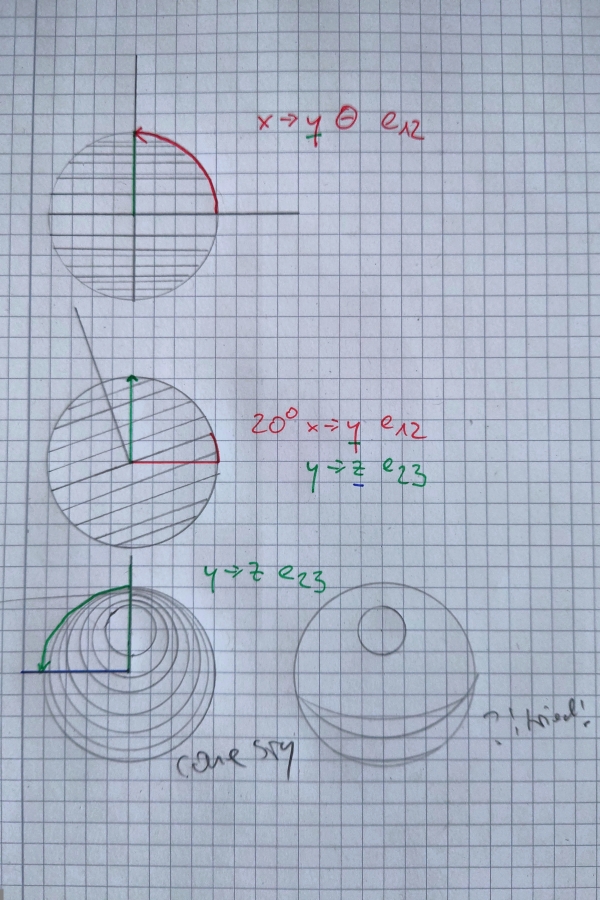
x = cos (θ) y = sin (θ) cos(φ) z = sin (θ) sin(φ)
Now for z. we alrady set both angles and have 2 coords already so looking from the front x and y will not change anymore. Its now only about the offset in depth.
You can easily get the second part of sin (φ) because the more you rotate in the 2nd rotation sin goes up (away from you) and the offset would be 0 if you dont rotate at all.
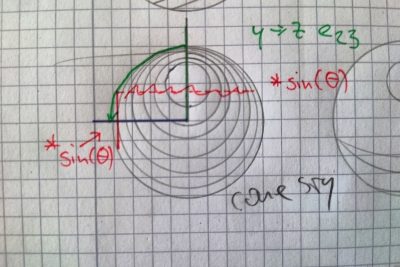
im so done i need a break lol
ok so thing is we always map 1,0 as a point then use 1, 2 or 3 angles.
1,0 2D 1,0,0 3D 1,0,0,0 4D
ok thats it. sleeeeep
AI!!!!
Every dimension is literally just taking (1, 0) and splitting it with (cos, sin).
In 2D: You start at (1, 0) on X. You split into X and Y.

In 3D: You take the leftover on Y, treat it as the new 1, and split into Y and Z.

In 4D: You take the leftover on Z, treat it as the new 1, and split into Z and W.
End AI.